
WorkNo. 04
Keeping the journey when a fare check fails
A selected train returned a bicycle restriction and no available fare. My project shows how to recover from this dead end: it explains the cause of the error, preserves the entered travel details, and lets the user easily compare alternative departure times. The prototype uses fictional fares and does not support real bookings or payments.
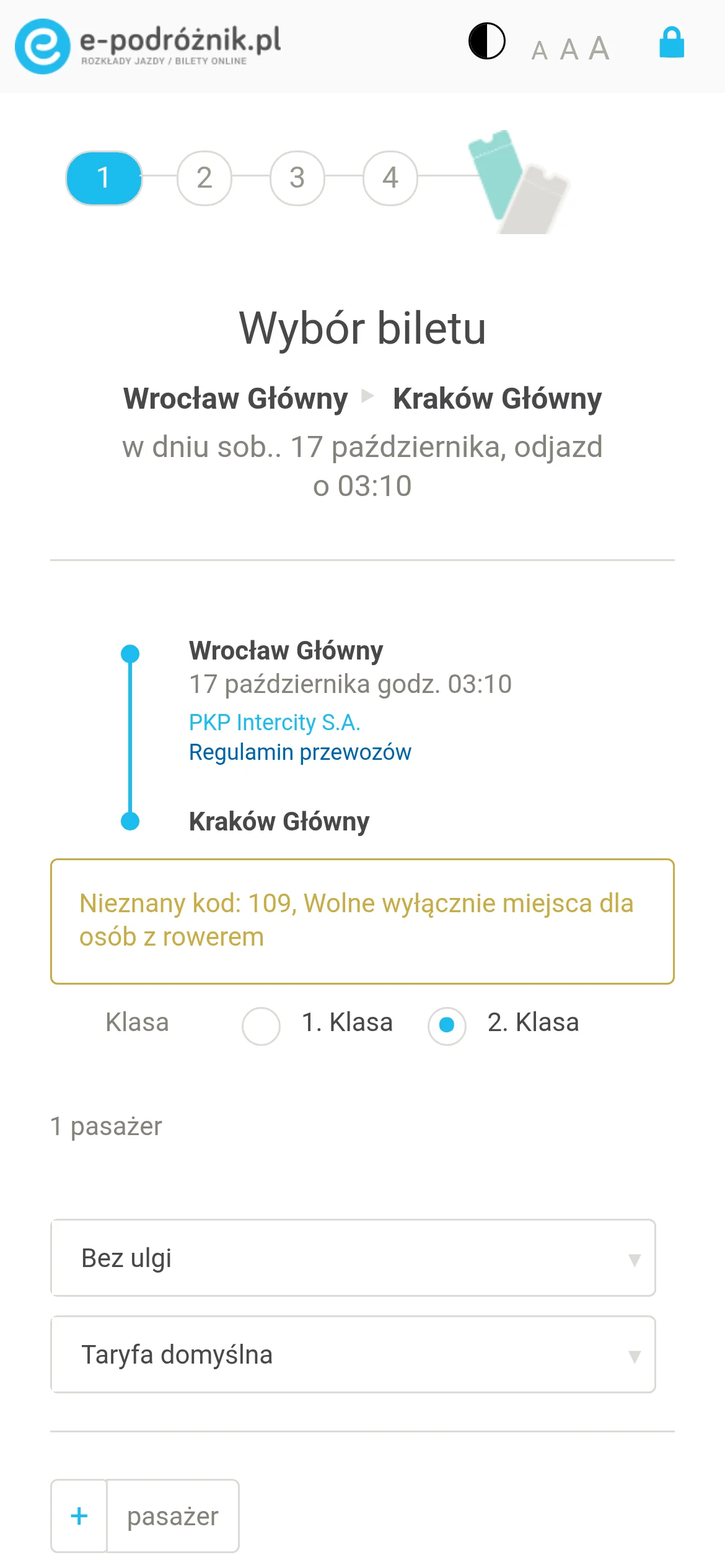
The 03:10 departure
In a walkthrough of the public mobile site, selecting the IC 431 train from Wrocław to Kraków (leaving at 03:10 on 17 October) triggered a message beginning with “Nieznany kod: 109”. The rest of it stated that only places for passengers travelling with a bicycle were available. The system could not calculate a ticket price, and the next step remained disabled.
The train appeared in the timetable, yet its price could not be confirmed for the passenger choosing it.
While the message did offer some explanation, it left the next move entirely to the passenger. Someone travelling without a bicycle had to find an alternative on their own. Better error wording could have explained the restriction more clearly, but wording alone could not propose another departure or decide which entered details should be preserved when the passenger changed course.
That change of course is what I designed for. The evaluation was anonymous and stopped before booking. It covered a 390 × 844 mobile viewport, mixed results (trains and coaches), and ticket selection for one train and one coach. Based on this observation alone, it is impossible to say how often the error occurs or how travellers typically react to it. Therefore, the starting point was a single recorded interface state, around which I designed and prepared a testable recovery path.
Fig. 1 Interactive exhibit
What the observation supports
Open a record to see what the inspection showed and what it can't support.
Restriction at ticket selection
Selecting the 03:10 IC 431 train triggered error code 109 and a message regarding a bicycle restriction.
- Basis for the decision
Screen capture from the mobile version of the site.
- Design response
Explain the cause of the restriction before offering the user another departure.
Prices entered the flow at different points
Coach rows showed adult fares. Train rows could lead to ticket selection without a displayed fare.
- Basis for the decision
Mixed results for Wrocław to Kraków.
- Design response
Give an unconfirmed fare its own text label.
The coach entry could proceed
The inspected FlixBus selection exposed fare and fee information, with the next step enabled.
- Basis for the decision
Anonymous ticket selection; no booking.
- Design response
Keep the guest flow in scope. Do not describe the observed fees as hidden.
The carrier contract and passenger response
No carrier API, booking history or participant sessions were available.
- Design response
Keep response semantics provisional and measure comprehension in a future study.
One displayed restriction supports a recovery hypothesis. It establishes no abandonment rate or platform-wide accessibility finding.
Separating the search from the response
I split the journey into distinct parts that the interface must not confuse:
- Search holds Wrocław, Kraków, the departure date, and the number of adults.
- Selected connection holds the departure time, stations, and carrier.
- Price applies to this specific connection and the current passenger configuration.
Changing one of these parts must not quietly make the others look confirmed.
This division also dictates the wording of system messages, as each response means something different:
- Bicycle restriction is a specific condition returned by the system.
- Unknown availability means no usable response was returned by the system.
- Failed price request means the operation itself failed.
In the last two cases, availability remains unresolved—neither provides grounds for displaying a "sold out" label. In the working prototype, you can toggle between these states without having to guess their meaning based solely on a color or a disabled button.
Obtaining a confirmed price still does not reserve a seat. The scenario with an available price moves to the review summary, but it never claims the seat has been held. There is no countdown timer here, as I do not have authoritative data regarding the duration of such a hold for this project. A real carrier integration would need to define precisely when a quote expires and what happens if the amount changes while reviewing the summary.
From restriction to another departure
The original screen documents the triggering event. In my proposal, the explanation is placed right beside the selected journey, while providing a clear path to alternative options.
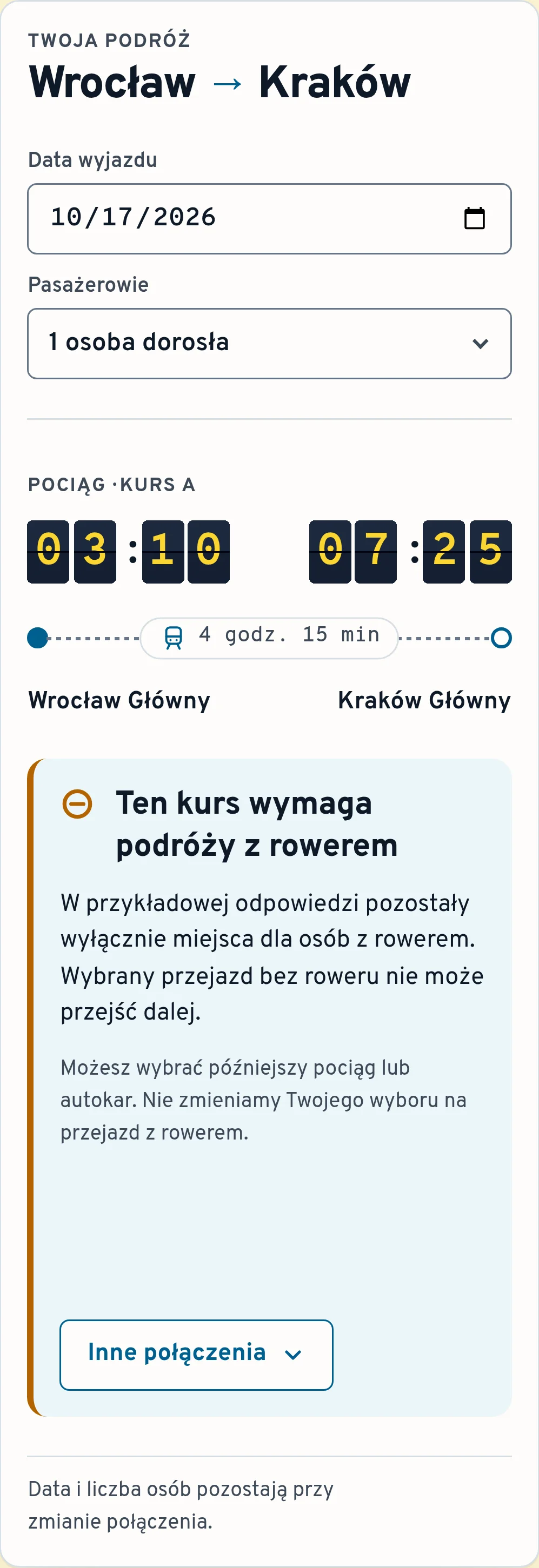
Original service: e-podróżnik. Proposal: an independent coded prototype. No usability improvement has been measured.
Explanation beside the chosen journey
The selected departure stays visible above the controls, allowing the traveller to re-check the times and stations while deciding on their next step. The list of alternative connections opens within the same view, preserving the previously selected date and passenger count.
This layout consumes more vertical space (especially on a mobile screen), and on longer routes with numerous options, returning to saved search results might offer a clearer overview. I left this alternative open for further evaluation—the fact that I designed one layout first does not dictate which one will prove more convenient for users.
Fig. 4 Interactive exhibit
Three recovery structures considered
The choice of a specific solution determines where the passenger must look next and what data the interface needs to preserve.
Explanation directly beside the selected connection
Keep the selected departure visible and expand alternative options directly beneath it.
- Basis for the decision
A suitable solution when there are few direct alternatives.
- Design response
Accept a longer view in exchange for keeping the error explanation strictly linked to the connection it applies to.
Return to preserved results
Restore the result list, its filters and the previous position. Mark the departure that could not proceed.
- Basis for the decision
Could make a large timetable easier to compare.
- Design response
Requires reliable return context and a clear reminder of the restriction.
Open a blocking dialog
Place the explanation over the selected journey and require a dismissal.
- Basis for the decision
Adds a focus boundary without adding recovery information.
- Design response
Avoid the extra layer for this recoverable state. Keep both the explanation and the alternatives in the page.
Try the recovery path
Test it in the following order:
- Start with the bicycle restriction message.
- (Select the option to change the connection)
- Open the list of other connections and choose a later train. The date and adult count will remain unchanged.
- Change either of those fields. The displayed price will be withdrawn until the next check completes.
The toggles located above the Polish interface load fixed, repeatable scenarios, allowing you to inspect every system response without needing a live connection to a transport service.
Fig. 5 Interactive exhibit
Four responses for a single journey
Explore a restriction, an unanswered system check, a failed request, and an available price. The prototype concludes at the review stage.
Independent prototype. Timetables, fares and responses below are fixtures; no ticket can be booked.
Choose a response, then recover through another departure. Change the date or passenger count to see the price require a new check. A retry in the unknown and failure examples receives a scripted available response.
See the selected responseTwoja podróż
Wrocław / Kraków
Pociąg · Kurs A
Wrocław Główny → Kraków Główny
Ten kurs wymaga podróży z rowerem
W przykładowej odpowiedzi pozostały wyłącznie miejsca dla osób z rowerem. Wybrany przejazd bez roweru nie może przejść dalej.
Możesz wybrać późniejszy pociąg lub autokar. Nie zmieniamy Twojego wyboru na przejazd z rowerem.
Razem79,00 zł
Data i liczba osób pozostają przy zmianie połączenia.
Wybierz inne połączenie
Zachowaliśmy datę i liczbę osób. Sprawdź stacje: autokar odjeżdża z dworca autobusowego. Po wyborze potwierdzimy cenę dla całej grupy.
03:10 → 07:25
Pociąg · Kurs A
Wrocław Główny → Kraków Główny
4 godz. 15 min · Cena wymaga sprawdzenia.
Cena do sprawdzenia
05:40 → 09:10
Pociąg · Kurs B
Wrocław Główny → Kraków Główny
3 godz. 30 min · Bez przesiadek.
89,00 zł
Razem · 1 osoba dorosła
05:15 → 09:25
Autokar · Kurs C
Wrocław, dworzec autobusowy → Kraków, MDA
4 godz. 10 min · Inne miejsca odjazdu i przyjazdu.
65,00 zł
Razem · 1 osoba dorosła
06:00 → 09:45
Pociąg · Kurs D
Wrocław Główny → Kraków Główny
3 godz. 45 min · Niepotwierdzona dostępność.
Cena do sprawdzenia
Sprawdź wybraną podróż
- Data wyjazdu
- Pasażerowie
Razem
To koniec prototypu. Cena jest przykładowa. Nie zarezerwowano miejsca, nie kupiono biletu i nie pobrano opłaty.
An answer belongs to the request that produced it
Suppose someone selects a coach while a train fare is still being checked. If the response for the train arrives later, it could overwrite the coach summary. The screen would still look coherent, but it would actually pair the selected journey with the wrong price.
The prototype prevents this—it ties every pending check to the specific request that initiated it. Selecting a new option, changing the date, or modifying the passenger count causes a delayed response from an older query to be discarded, preventing it from updating the screen.
A short delay has been added to each check in the prototype so you can observe this logic in action: while a check is running, select a different scenario or change the adult count. The earlier answer will not affect the new interface state.
This is local, simulated behavior. Connecting to a real service would require an API contract that unambiguously identifies the specific departure, passenger configuration, and response validity period—guarantees that a simple browser timer cannot provide on its own.
Fig. 6 Interactive exhibit
Meaning of states and permitted actions
Each state has a assigned meaning and a permitted next step. A price is displayed only when a given scenario returns a usable answer for the currently selected configuration.
Keep navigation available
Signal that a request is in progress while maintaining constant visibility of route details and passenger counts.
- Design response
Inform the user about the ongoing data verification without repeatedly shifting focus.
Explain the supported condition
The selected example permits only travellers with bicycles.
- Design response
Offer another departure. Never add a bicycle on the passenger’s behalf.
Keep availability unresolved
An absent answer and a failed fare request have different messages. Neither confirms sold out.
- Design response
Allow a deliberate retry or another connection.
Withdraw the previous quote
Date or passenger changes invalidate the amount. Another departure starts its own check.
- Design response
Retain the search fields and ignore older pending responses.
Expose a total for review
Show the example total for the current adult count.
- Design response
Proceed only to a review summary. A confirmed example price makes no reservation.
Withdrawing a price after input changes
An old amount left on screen can look as if it still applies to the new choice. After a date or passenger edit, the prototype removes the previous price and offers a fresh check. The route and entered details remain available until the new response arrives.
The fixture covers adults only and multiplies a fixed per-person fare. It cannot represent concessions, age rules, or group inventory. Those inputs would need validity rules of their own: preserving an entered field is helpful only as long as its meaning holds for the selected carrier.
Reading order and navigation as part of recovery
Most controls are native browser elements. Test scenarios are selected using standard radio buttons, while journey parameters are set via a date field and an adult-count dropdown. Recovery actions are triggered by native buttons. Their visible labels describe the action directly: Check again, Show other connections, or Review chosen journey. Relying on native controls preserves default keyboard behaviour and leaves fewer custom interactions to explain.
Focus movement and announcements follow the traveller's intent:
- A fare response arriving in the background updates a polite status announcement (aria-live="polite") without interrupting speech or moving focus.
- Opening the list of alternatives is an explicit navigation action, so focus moves to the alternatives heading.
- Selecting an alternative connection returns attention to the updated operation status.
- Review has its own heading and a clear return action.
- A loading state does not trap the user, and errors are presented visually as well as in explicit text.
These principles draw on the W3C guidance on status messages, which distinguishes an update announced without taking focus from a full change of context. That distinction is essential here: a fare arriving in the background and a user deliberately opening alternatives require completely different handling.
Because no screen-reader audit has been conducted yet, these design choices still require verification with assistive technologies.
Another connection may mean another station
In the sample dataset, the train runs between Wrocław Główny and Kraków Główny. The coach, however, leaves from the bus station and arrives at Kraków MDA.
On this route, a coach is a plausible alternative to rail. Changing the mode of transport, however, changes the endpoints at both ends. Both stations are therefore clearly shown in the alternative list before selection and again in the journey review. A lower fare alone cannot tell anyone whether transferring to that station works for someone travelling with heavy luggage or mobility constraints.
Signalling a station change before selection
The coach option explicitly names both stations, signalling a different departure and arrival location upfront. The selected adult count carries over. The interface asks for a fresh price check, while alternative options display the total for the current group immediately, making the cost for two adults visible before selection.
A review of synthetic scenarios helped verify this part of the design. It highlighted potential edge cases, such as treating a coach as interchangeable with a train without noticing the station change. These scenarios serve as design prompts: they say nothing about how often real travellers would miss the station change or which alternative they would prefer.
What can be tested in this prototype
The developed artifact makes a narrow set of behaviours inspectable under repeatable conditions:
- all four system response types,
- selecting an alternative departure,
- preserving the date and passenger count,
- invalidating a quote when inputs change,
- a review summary that stops before payment.
One shortcut is noted beside the controls: retrying an unanswered or failed check returns a scripted success scenario. This merely demonstrates the state transition and implies nothing about whether a second attempt normally succeeds in production.
The prototype also clearly demonstrates its technical limits. Changing the date does not fetch a real timetable. Alternatives are fictional, checking a price creates no reservation, and the calculated total covers full-fare adults only. There is no seat map, bicycle booking, transfer guarantee, or payment gateway return. A production system would require authoritative business logic for each of these before making corresponding promises.
Next step: user testing
What remains unknown is whether travellers can correctly interpret a given state and select a suitable path forward without guidance.
In a moderated task, a participant would be given an arrival deadline and a budget, shown the restriction, and asked to continue. Session records should capture:
- the final departure chosen,
- how the participant interprets the displayed fare,
- any fields they have to re-enter,
- any facilitator intervention required.
A confident explanation can still be wrong—confidence alone does not constitute UX success.
Testing must include regular users of screen readers, keyboard navigation, and screen magnification operating their own hardware and software. These sessions would evaluate the sequence and timing of announcements as well as control operability. Comparing this layout with the preserved-results variant would then reveal whether an inline explanation truly aids recovery or merely lengthens the page. No such participant sessions have been conducted for this study yet.